

Who Does What: Syncing Your VA and AI Without Losing the Personal Touch
Last week we talked about why AI alone and a VA alone both stall. This week is the practical part: how to split the work so each side does what it is best at.
The rule we build everything on is simple. AI handles volume. People handle judgment. The agent handles relationships.
The workflow behind a LORE newsletter
Here is how one of our monthly agent newsletters actually gets made. It is the clearest example we have of a synced system, because it runs every month for every client and we can see exactly where time goes.
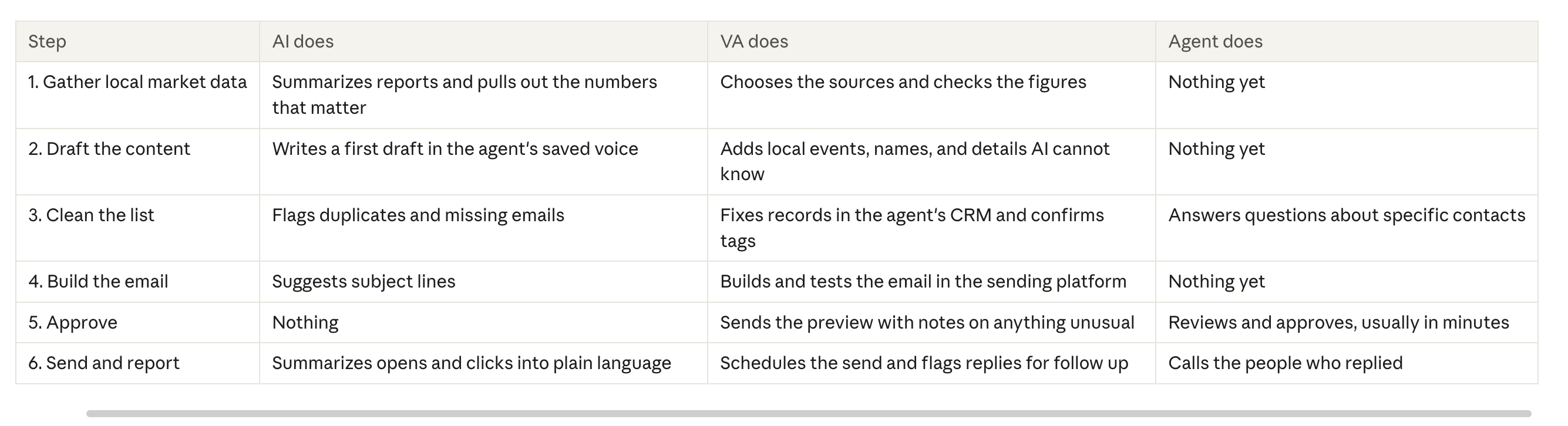
Notice what the agent does: approve and follow up with real people. That is the job only they can do, and it is the part that turns a newsletter into listings.
Three rules that make the handoffs work
The AI never has the last word. Every piece of AI output passes through a person before a client sees it. AI will confidently state a median price from the wrong zip code. Your VA catches that. Your reputation depends on it.
Save the prompts like you save the process. When your VA finds a prompt that produces the right tone, it goes into the written process for that task, not a personal notes app. If your VA is out for a week, someone else can pick it up and get the same result.
Keep one place for status. We learned this one the hard way. When tasks live across email, texts, a project board, and someone's memory, things slip. Pick one place where every task and its status lives, and make using it part of the job, not a suggestion.
What to hand AI first
If you are just starting, these are the safest and fastest wins:
First drafts of anything recurring: newsletters, market updates, social captions
Summaries of long documents, like inspection reports or HOA rules, for your VA to review
Sorting and flagging problems in your database before your VA cleans it
Turning your notes from a call into a follow up email draft
What stays human
Some work should never go to a machine, no matter how good the tools get:
Anything a client will read without review
Decisions about who gets a call, a gift, or a personal note
Conversations with people who are upset, grieving, or confused
Knowing that a past client just changed jobs or had a baby, and doing something about it
Start with one workflow
Do not try to sync your whole business at once. Take one recurring task, map it in a table like the one above, and run it for a month. Adjust what is not working. Then move to the next one.
Next week, we will cover the mistakes that break these systems, including a few we made ourselves.
Want help mapping your first synced workflow? Book a call and we will walk through it with you.